




 Global Finds
  Quick Commerce
  Daily Bazar
  Electronics & Appliances
  Mother, Baby & Toys
  Beauty
  Sports
  Automotive
  Stationery, Books & Music
 _20.png) Fashion Luxe
Fashion Luxe  Fashion
 _20.jpeg) Home
Home  Garden & Pet Care
  Special Weekly Offer
  Grocery
  Global Finds
  Quick Commerce
  Daily Bazar
  Electronics & Appliances
  Mother, Baby & Toys
  Beauty
  Sports
  Automotive
  Stationery, Books & Music
 _20.png) Fashion Luxe
Fashion Luxe  Fashion
 _20.jpeg) Home
Home  Garden & Pet Care
  Special Weekly Offer
  Grocery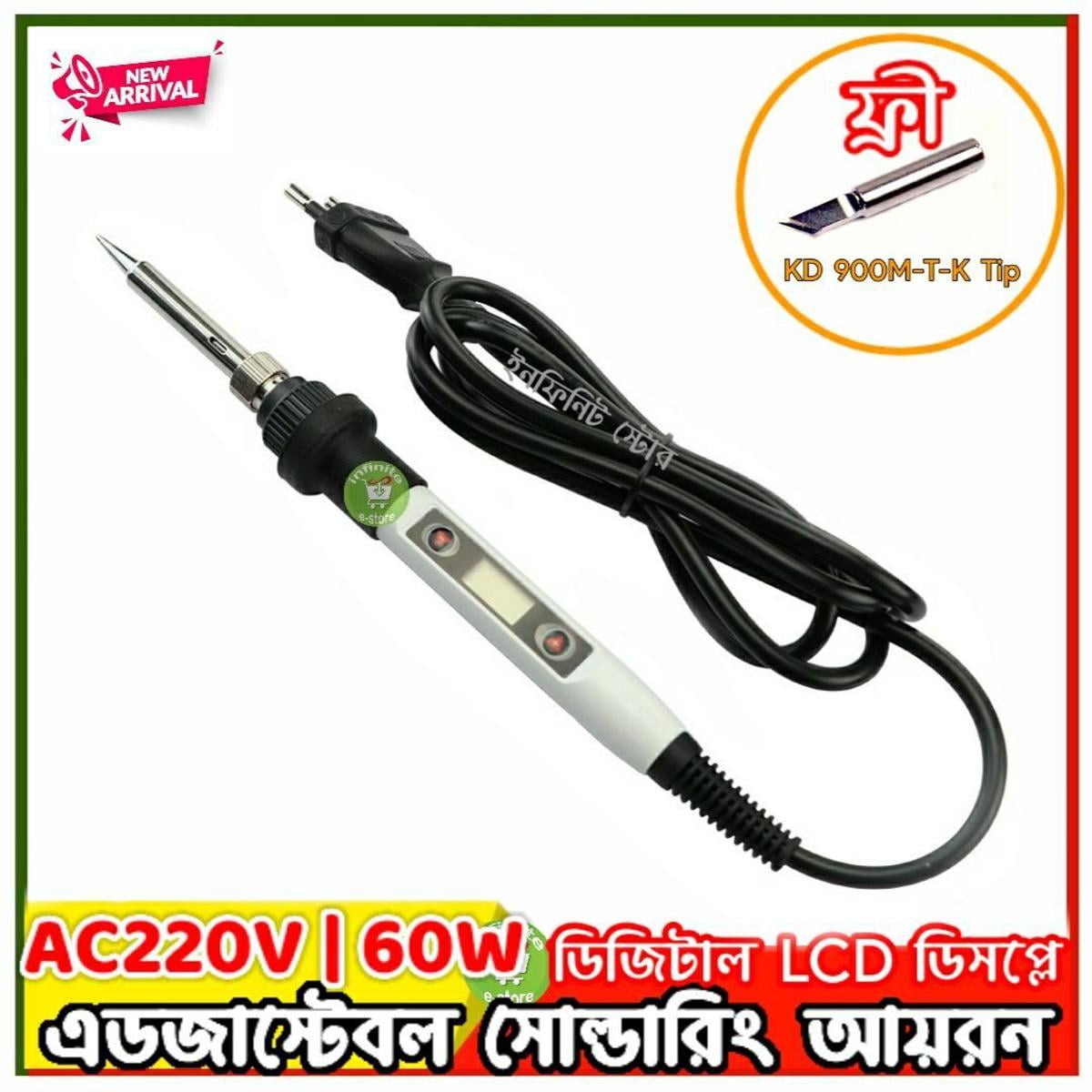
Instruction:
Press the (+) button once to increase 1℃; press and hold it to increase temperature continuously.Press the (-) button once to reduce 1℃; press and hold it to reduce temperature continuously.The newly set temperature will be saved after 3 seconds,and will keep the temperature for next time powering-on.When (℉) or (℃) symbol flashes, it means the heating core has not reached the set temperature.
Temperature Calibration:
1.After 60 seconds of power on, put the soldering tip on a thermometer,and a moderate amount of solder on the soldering tip; make the testpoint and the soldering tip have good touch.2.When thermometer displays a stable temperature (about 2 seconds), write down the temperature.3.Move soldering iron away from thermometer;press the (-) and (+) button at the same time to entertemperature Calibration.4.Input adjustment quantity. Adjustment quantity=settemperature - measured temperature (see example)5.Press the (-) and (+) at the same time to exittemperature interface, finished.Example 1, when setting temperature is 350℃ whilemeasured temperature is 342℃, the correction stepsare as follows:a.press the (-) and (+) at the same time to entertemperature correction interface.b.press the "+" button till the LCD displays 8℃c.press the (-) and (+) at the same time to exittemperature correction interfaceExample 2, when settingtemperature is 350℃ whilemeasured temperature is330℃,the correction stepsare as follows:a.press the (-) and (+) at the same time to entertemperature correctioninterface.b.press the (-) button tillthe LCD displays -20℃c.press the (-) and (+) at the same time to exittemperature correctioninterface
Parameter setting:
1.To press the red and white button both atthe same time before it is power on, poweron,after the LCD is working,stop to press thebutton, you will enter the setting menu.TheLCD shows (F) or (C)2.Press the white button to choose C(degreecentigrade) or F(Fahrenheit).Press the Redbutton to choose Element U20(JCD01),U20(JCD02),U30(JCD03),U40(JCD04).3.Pressing the (-) and (+) at the same timeto save your setting operation and quit thesetting menu(finished)To protect the user from scald, when on thesetting menu, it will stop heating.
Failure warning indication
The LCD shows (OP): the heating element is open circuit.Solution:1.change the element.2.To confirm that whetherthe pin of element is oxidized.The LCD shows(E1):The outlet is poor contact,or the batterysource interfering the soldering iron that it is power down.Solution:1.Unplug the soldering iron.2.Close the interferingsource. 3.To use it far away from the interfering source.Note:Please do not touch the soldering tip and tube when the power isturned on.
- Voltage: AC220-240V
- Power:60W
- Frequency: 50Hz/60Hz
- Temperature Range: 180~500℃/356~932℉
- Temperature Stability: ±5℃
- Heating Type: Wmore Ceramics Element Soldering Iron
- Tips: 900M-B1.2
- Wire Length: 1.4m / 55.12in
- Soldering Iron Size: Approx.242*25*25mm/9.6*0.98*0.98in
- Soldering Iron Weight: Approx.96g/3.4oz
- Package Size: Approx. 254*55*35mm/10*2.2*1.4n
- Package Weight: Approx. 139g / 4.9oz
- #soldering iron

Login to ask a question
