




 Daily Bazar
  Electronics
  Sports
  Automotive
  Stationery, Books & Music
  Lifestyle
  Fashion
 _20.jpeg) Home
Home  Garden & Pet Care
  Grocery
  Daily Bazar
  Electronics
  Sports
  Automotive
  Stationery, Books & Music
  Lifestyle
  Fashion
 _20.jpeg) Home
Home  Garden & Pet Care
  Grocery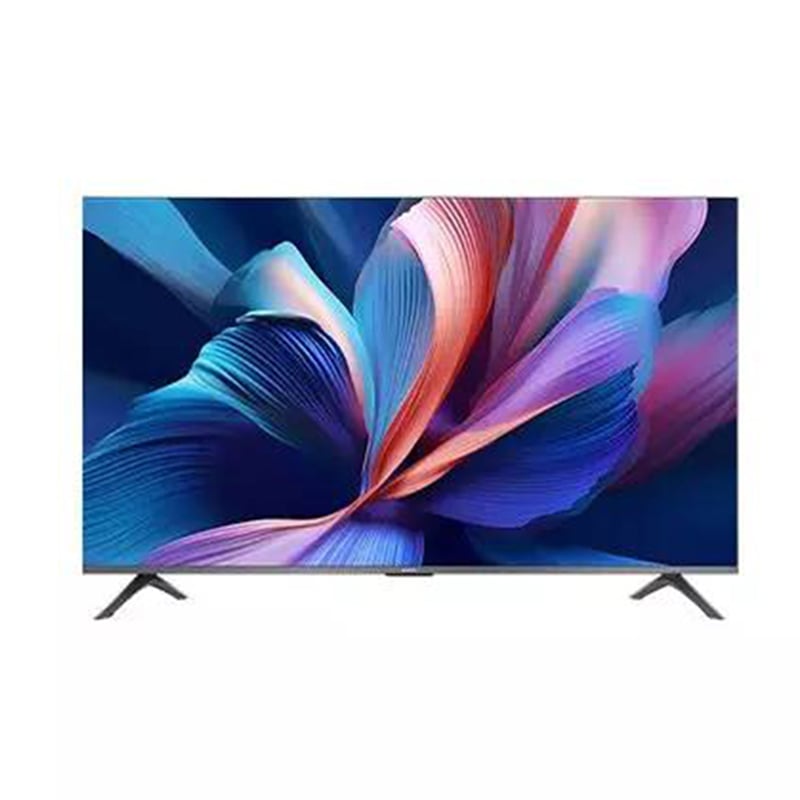
Specifications
Processor
Processor: Quad Cortex A55
Memory
Memory: 2GB
Storage
Storage: 8GB
Display
Screen Size: 55-inch Resolution: 4K, 3840 × 2160 Panel Type: QLED Refresh Rate: 60Hz HDR: HDR10+, HLG, Filmmaker Color Gamut: DCI-P3 94% (Typ.) Viewing Angle: 178°(H) / 178°(V) Color Depth: 1.07 billion Display Details: MEMC - 4K 60Hz; Limitless display with bezel-less design
Graphics
Supported Graphics: Mali-G52 MC1
Networking & Connectivity
Wi-Fi: Dual-band 2.4GHz/5GHz Bluetooth: 5.0
Audio & Microphone
Speaker: 2 × 10W Audio Features: Dolby Audio, DTS-X, DTS-Virtual
Dolby and the double-D symbol are registered trademarks of Dolby Laboratories Licensing Corporation.
It requires video and audio streaming content that supports Dolby audio and DTS decoding.
Battery and Power
Power Consumption: Standby power - ≤0.5W Power: 130W Voltage: 200-240V~50/60Hz
Ports
USB: USB 2.0 × 1 HDMI: HDMI × 3 HDMI Features: HDMI 2 supports eARC and ALLM
Software
Operating System: Google TV
Google TV is the name of this device's software experience and a trademark of Google LLC. Google, YouTube, Google Cast, YouTube Kids and other marks are trademarks of Google LLC.
Special Features
Chromecast: Requires Google Cast-enabled apps.
Others
Accessories:
-
Display × 1
-
Power cable × 1
-
Safety and installation instructions × 1
-
Base components × 2
-
Screw kit × 1
-
Bluetooth Remote Control × 1
Other Features:
-
Miracast: Supported
-
Apple AirPlay: Supported
-
Stand: Double
-
Power Button: Available
-
Ethernet (LAN): Yes
-
Optical Digital Audio Out: Yes
-
CI+ Slot: Yes*
-
Broadcasting System: DVB-T2+C/DVB-S2*
Apple, AirPlay, iPad, iPhone are trademarks of Apple Inc., registered in the U.S. and other countries and regions. To use AirPlay with Xiaomi TV A Pro 43UHD 2026, the latest version of iOS, iPadOS, or macOS is recommended.
Physical Specification
Environment:
-
Operating Temperature: 0°C to 40°C
-
Storage Temperature: -15°C to 45°C
-
Humidity: 20% to 80%
-
Relative Humidity:
Xiaomi A Pro 2026 (55") is a stylish and feature-rich QLED 4K UHD smart TV that delivers exceptional picture and sound quality in a compact size perfect for bedrooms, living rooms, or offices. Its 55-inch QLED panel with 3840 × 2160 resolution, 94% DCI-P3 wide color gamut, and 1.07 billion colors ensures vivid and accurate visuals. With HDR10+, HLG, and Filmmaker Mode, movies and shows look cinematic and lifelike. Sound is equally impressive with 2 × 10W speakers enhanced by Dolby Audio, DTS-X, and DTS-Virtual, producing rich surround sound. Powered by a Quad-core Cortex-A55 processor, Mali-G52 GPU, 2GB RAM, and 8GB storage, it runs Google TV™ smoothly, giving you access to YouTube, Netflix, Prime Video, Disney+, and thousands of apps. Smart features include Google Assistant, Google Cast, Apple AirPlay, and Miracast, allowing you to control, share, and stream content effortlessly. For connectivity, it supports Bluetooth 5.0, Wi-Fi dual-band, HDMI (with eARC & ALLM), USB 2.0, Ethernet LAN, and optical audio out. Its bezel-less metal frame design with a dark gray finish gives a premium look, while the 200 × 300mm wall-mount support or dual stand offers flexible placement. With a power consumption of just 130W and lightweight design (6kg with stand), this TV is efficient and easy to set up.
Does the Xiaomi A Pro 55 support Dolby Vision?
No, but it supports HDR10+, HLG, and Filmmaker Mode, which still provide excellent HDR performance.
Is this TV good for gaming?
Yes, with ALLM (Auto Low Latency Mode) and HDMI eARC support, it’s suitable for casual gaming and streaming.
Can I use voice commands?
Yes, the TV has Google Assistant built-in for voice control and also supports Google Cast and Apple AirPlay.
Warranty: 03 Years panel and 02 Years parts & 02 Years Service warranty by Xiaomi. Warranty card must be kept for warranty claims. For warranty, Call Xiaomi at 09612942664. Seller Warranty
Note: Product delivery duration may vary due to product availability in stock.
Disclaimer: The actual color of the physical product may slightly vary due to the deviation of lighting sources, photography or your device display settings.

Login to ask a question
